
GRAYLOG : Critical Windows Event ID’s to Monitor
Like most organizations, your company likely invested in various Microsoft products. The Microsoft ecosystem provides businesses with nearly every kind of technology necessary, from workstation operating systems to Azure to Windows 365 that includes cloud-native versions of their traditional Office tools and the communication platform Teams. However, attackers are just as invested in the Microsoft
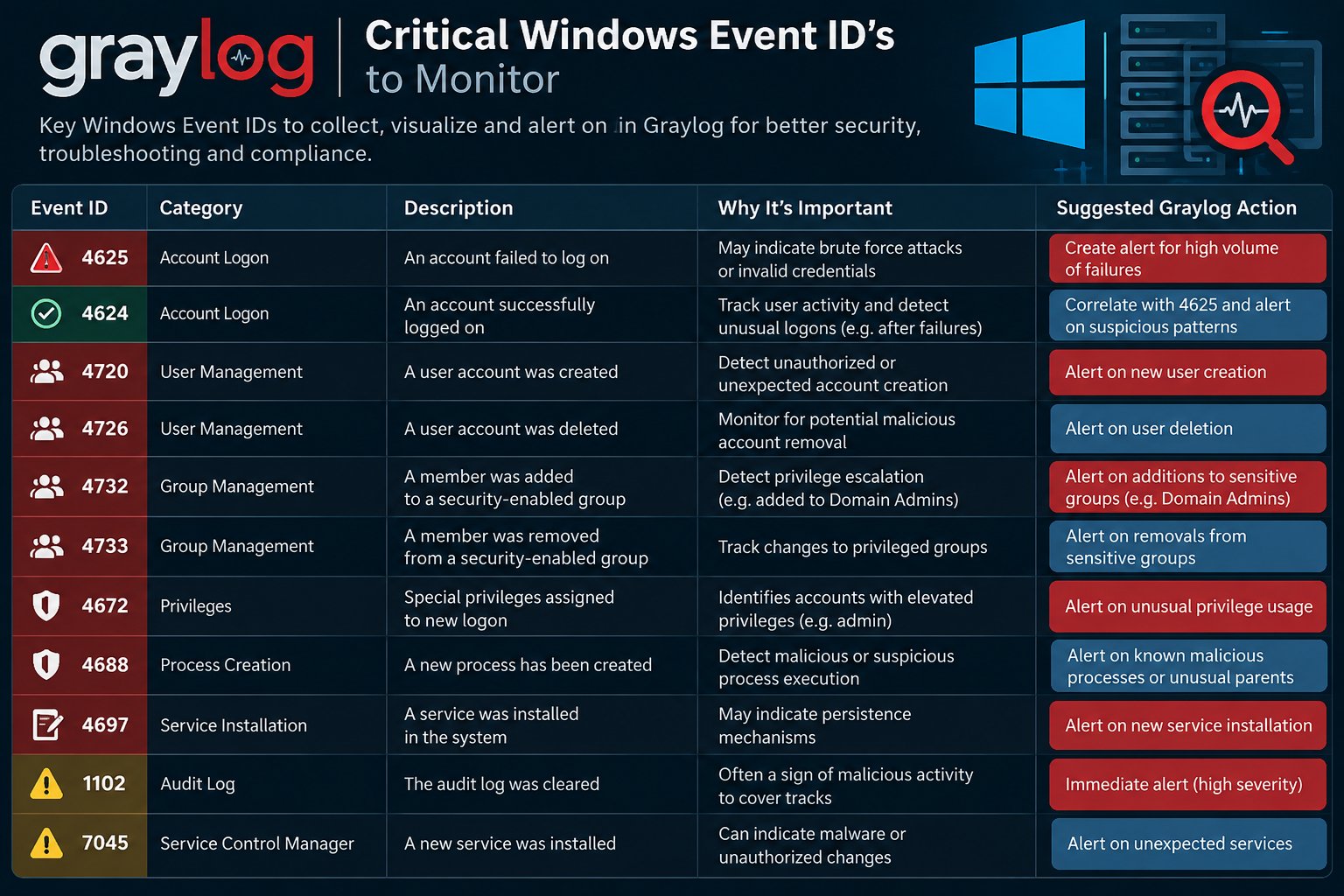
As you build out your security program, you should know some of the more critical Windows Event IDs to monitor and what they mean.
Logon Events Microsoft’s basic security audit policy best practices suggest defining failure or success for account and general logon events. Some critical Event IDs include:
4624: User successfully logged on to a computer 4625: Attempt made to logon with unknown user name or bad password and failed 4634: Logoff process completed for user 4647: User Initiated logoff 4648: User successfully logged on to a computer using explicit credentials while already logged on as different user 4779: User disconnected terminal server or virtual host session without logging off 4798: A user’s local group membership was enumerated. 4799: A security-enabled local group membership was enumerated 4820: A Kerberos Ticket-granting-ticket (TGT) was denied 4821: A Kerberos service ticket was denied because the user, device, or both does not meet the access control restrictions 4822: NTLM authentication failed because the account was a member of the Protected User group 4823: NTLM authentication failed because access control restrictions are required 4824: Kerberos pre-authentication by using DES or RC4 failed because the account was a member of the Protected User group
Account and Identity Management 4720: A user account was created. 4722: A user account was enabled. 4723 / 4724: An attempt was made to change or reset an account’s password. Password resets by non-admins or outside business hours are a key indicator. 4725: A user account was disabled. 4726: A user account was deleted. 4728 / 4732 / 4756: A member was added to a security-enabled global/local/universal group. Critical for detecting unauthorized privilege escalation via group membership changes. 4729 / 4733 / 4757: A member was removed from those same group types. 4740: Account lockout events occur when a user’s account is locked out after multiple failed logon attempts — a strong indicator of brute-force or password spraying. 4767: A user account was unlocked. 4781: A user account name was changed (renaming accounts is a common evasion technique).
Active Directory and Domain Changes 4706: A new trust was created to a domain. 4713: Kerberos policy was changed. 4716: Trusted domain information was modified. 4739: Domain Policy was changed. 4727 / 4737 / 4754 / 4755: Security-enabled global/universal groups were created or changed. 4780: The ACL was set on accounts which are members of administrator groups. 4865 / 4866 / 4867: A trusted forest information entry was added, removed, or modified. Forest trust manipulation is a high-value lateral movement technique.
Privilege Use Managing how people use their access falls into multiple categories, including object access, non-sensitive privilege use, and sensitive privilege use.
The Event IDs for managing access fall into several categories, including:
Object Access: resources people use, like files, folders, registry keys, or printers. Audit File System: operating system audit events when users attempt to access file system object that have system access control lists (SACLs) and requested access types (Write, Read, Modify) Audit Non-Sensitive Privilege Use: how people use standard access across Microsoft technologies from workstations to remote systems to files. Audit Sensitive Privilege Use: how people use privileged access like acting as part of the operating system or enabling accounts to be trusted for delegation.
Some important Event IDs to consider include:
4103: PowerShell Module Logging 4104: PowerShell Script Block Logging 4656: Request to handle or access an object 4658: Handle to an object was closed 4659: Handle to an object was requested with intent to delete 4660: Object deleted 4663: Attempt to access object was made 4664: Attempt to create a hard link was made 4670: Object permissions were changed 4672: Special Privileges Assigned to New Logon 4673: Calling privileged service 4674: Attempted operation on a privileged object 4985: Transaction state change 4691: Indirect access to an object was requested. 4698: A scheduled task was created. 4699: A scheduled task was deleted. 4700: A scheduled task was enabled. 4701: A scheduled task was disabled. 4702: A scheduled task was updated. 5051: File was virtualized
Windows Server The following Event IDs can potentially indicate a high criticality event that applies to Windows Server 2022, Windows Server 2019, Windows Server:
1100: The event logging service has shut down 1101: Audit events have been dropped by the transport. 1102: Audit log cleared 1104: The security Log is now full 4618: Monitored security event pattern occurred 4649: Potential replay attack detected 4719: Change to system audit policy 4765: SID History added to an account 4766: Failed attempt to add SID History to an account 4794: Attempt at setting Directory Services Restore Mode 4897: Role separation enabled 4964: Special groups assigned new logon 5124: Update to security setting on OCSP Responder Service
Process and Execution Monitoring 4688: A new process was created. This is essential for spotting malware execution or unusual scripts, and is one of the most important Event IDs for SIEM monitoring. Pair it with command-line auditing enabled via Group Policy for full visibility. 4689: A process was terminated. Useful for baselining process lifecycles and detecting abnormal terminations.
Microsoft Defender Antivirus The following Event IDs indicate an event with Microsoft 365 antivirus:
1002: malware scan stopped before completing scan 1003: malware scan paused 1005: malware scan failed 1006, 1116: malware or unwanted software detected 1007, 1117: action to protect system performed 1008, 1118: action to protect system failed 1009: item restored from quarantine 1012: unable to delete item in quarantine 1015: suspicious behavior detected 1119: critical error occurred when taking action
Windows Firewall Changes If policy dictates Windows Firewall should never be disabled, it is crucial to monitor this activity.
4946 / 4947 / 4950: Changes to Windows Firewall rules (rule added, rule modified, setting changed). Attackers frequently modify firewall rules to open ports or disable blocking. 5025: The Windows Firewall service was stopped. 5031: Windows Firewall blocked an application from accepting connections.
Graylog: Operations and Security Information for Windows Event ID Monitoring With Graylog, you can build a single source of log information that enables observability and visibility across a complex environment. Graylog ingests all log data, no matter what service generates it, then applies a standardized data model so that you can correlate and analyze all events. Since your IT operations and security teams share the same information, they can communicate more effectively.
Further, with Graylog’s lightning-fast search capabilities, your security and IT teams can get the answers they need, even when they’re searching terabytes of data. Purpose-built for modern log analytics, Graylog gives you the two-for-one solution necessary to improve performance and reduce cybersecurity risk. Our cloud-native capabilities and out-of-the-box security content give your teams the ability to collaborate effectively, reducing service downtime and alert fatigue.
To learn how Graylog can help you save money and respond more effectively to issues,